---BREAKAWAY CIVILIZATION ---ALTERNATIVE HISTORY---NEW BUSINESS MODELS--- ROCK & ROLL 'S STRANGE BEGINNINGS---SERIAL KILLERS---YEA AND THAT BAD WORD "CONSPIRACY"--- AMERICANS DON'T EXPLORE ANYTHING ANYMORE.WE JUST CONSUME AND DIE.---
With Microsoft working hard to fold the venerable MSN Messenger network and client into Skype,
Microsoft is left with two messaging products: Skype and Lync. The
future of these apps is integration and interconnection. That's not
today's reality, however.
As with the rest of the Office suite, Lync has been refreshed as part
of the Office 2013 version. In common with the rest of Office 2013,
it's been given a simpler, flatter look to make it Metroesque, if not
actually Metro style. The two most important and sensible features here
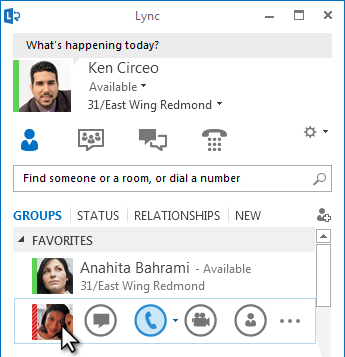
are "Quick Lync," a set of actions that appear whenever the mouse is
over a contact in your list, and tabbed messaging windows.
The Quick Lync menu shows when the mouse is over a contact's picture.
Microsoft
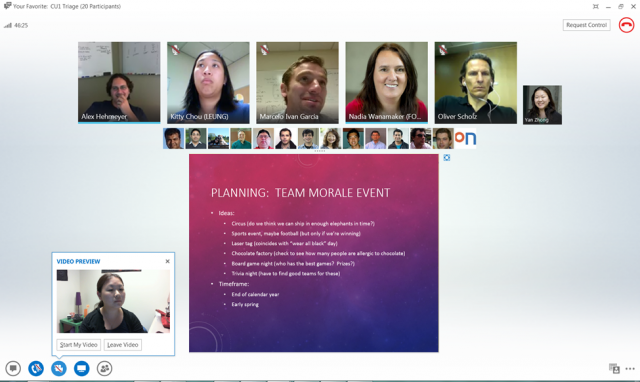
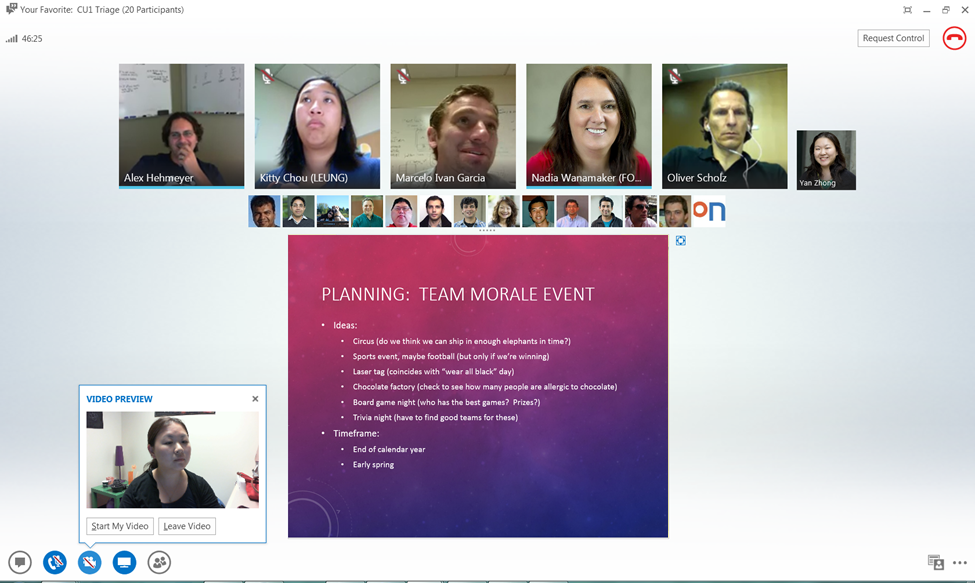
Video chatting has also been streamlined with a preview that shows
what your webcam is seeing before you start a video call and a "gallery
view" for multi-person video calls that shows video for the five most
active participants but replaces others with static images.
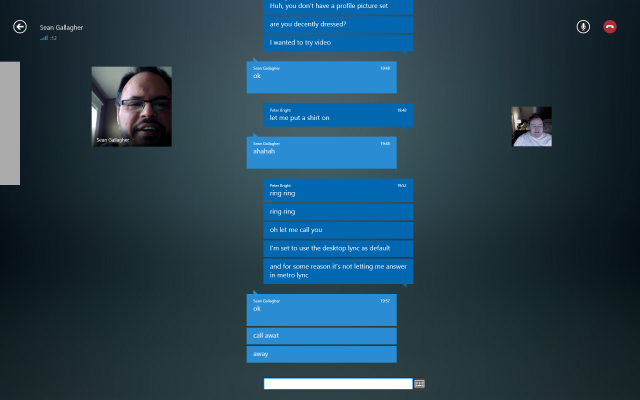
If Metroesque isn't enough, there's also an actual Metro Lync client
for Windows 8 and Windows RT that includes basic functionality. The
first version of this was pretty ropey. It was filled with sign-in
issues, to the extent that it wouldn't even let me sign in, which
rendered it useless. However, it was updated yesterday
and does now work. For mobile users, there's a Lync client for Windows
Phone, iOS, and Android (though still branded as version 2010) that can
also perform basic Lync tasks when on the go.
I don't use Lync a huge amount—primarily for occasional screencasts
and conference calls rather than day-to-day messaging—but it has always
worked when I needed it and the new client is pleasingly designed and
works well. In truth, I would like to use it more than I do, but that's
dependent on the messaging predilections of colleagues and co-workers. I
like the look of the new client, and the handling of tabbed
conversations is sensible; individual conversations can easily be popped
out of the tabbed window or popped back in.
However, as mentioned, Lync isn't Microsoft's only messaging
platform. There's also Skype. Both platforms support instant messaging.
Both platforms support voice chatting, both two-way and multi-person.
Likewise video chat and desktop sharing. Both also support telephony
bridging, albeit in different ways. Lync can connect to telephony
systems that use standard SIP (Session Initiation Protocol) technology,
whereas Skype's system is a black box of proprietary magic that just
happens to connect to PSTNs (public switched telephone networks).
Lync can bridge to Microsoft's Messenger network if administrators
choose to enable the option, and Microsoft is currently merging the
Skype and Messenger networks.
Finally, they both have a "presence" system to indicate when you're
available to talk. Lync's is neatly integrated into Outlook,
automatically showing you as unavailable when you have a meeting or are
on a call. Skype's integration is less automatic; a plugin was recently released for 32-bit Outlook that provides comparable facilities.
The functional overlap here is hard to overstate. Even before buying
Skype, Microsoft had software that did essentially everything that Skype
does; Skype just brought users and a number of contractual agreements
with telephone services around the world to provide PSTN functionality.
Where the two products differ substantially is their billing model.
Skype's instant messaging, two person voice and video chat, and two
person desktop sharing are all zero cost. Just download the client,
create an account, and you're on your way. Microsoft charges for PSTN
connectivity and group voice, video, and desktop sharing.
Lync, on the other hand, needs a Lync 2013 server either on premises or in the cloud
and appropriate client licenses. So while Skype is consumer friendly
and, for many users, zero cost, Lync's pricing is oriented around
enterprises.
Rather than using one of these systems to replace the other, Microsoft plans in June
to roll out a bridge between Lync and Skype. Lync will be able to
connect to Skype for presence and one-to-one IM and audio calls. Other
features will come later, with video calling being the next priority.
What's so mysterious about this is the question of why
Microsoft is doing any of it. The Lync 2013 client is a better piece of
software than Skype. Its look is cleaner and simpler, its support for
tabbed chats is a must-have, its Outlook integration is more thorough.
Instead of bridging Skype and Lync, Microsoft should be moving Skype to
Lync so that everyone can use the superior client for all their
messaging needs. It just works better.
If Microsoft wants to keep the Skype brand around then by all means
do so. Create a rebranded Lync client—one that uses public, no-cost
Microsoft servers rather than private ones or Office 365 ones—and name
it "Skype." As long as we can use the better client application, it
doesn't really matter what it's called.
But rather than doing this, it appears that Redmond is content to
have two parallel applications that are all but identical in
functionality, with the good one for corporate users and the bad one for
everyone else.

 Posts
Posts




No comments:
Post a Comment